
In Gemini, the division between the Chat window for everyday communication and the Task window for serious, structured production is conceptually spot on. Yet the gaps encountered across four distinct usage surfaces on Web and Android, the conveniences kept disabled inside the Task window, and interface regressions left unfixed for months raise a pressing question: why is such a capable infrastructure persistently left half-finished?
Aydın Tiryaki (22 November 2026)
Version 1.04
Two Fitting Names, One Half-Finished Experience
Working habits within the Gemini ecosystem are now clearly taking shape around two distinct windows. The Chat window stands out for everyday tasks, quick information retrieval, and mutual exchanges of ideas, while the Task window comes to the fore for more serious, multi-step, professional work aimed at producing concrete outputs. To be fair, both the conceptual framework behind this division and the names chosen for it are quite apt. “Chat” and “Task” clearly signal to the user which door to walk through for which purpose.
The real problem lies not in the purpose of these windows, but in how they are delivered in practice. Many interface features that offer great comfort to the user in the Chat window suddenly vanish the moment one moves into the Task window, where the heaviest and most structured work takes place. Moreover, this is not an isolated hiccup; every new field experience brings another restriction that amplifies the question of why the Task window is continuously left incomplete.
From Suggestion Chips to Export Tools: New and Old Gaps in the Task Window
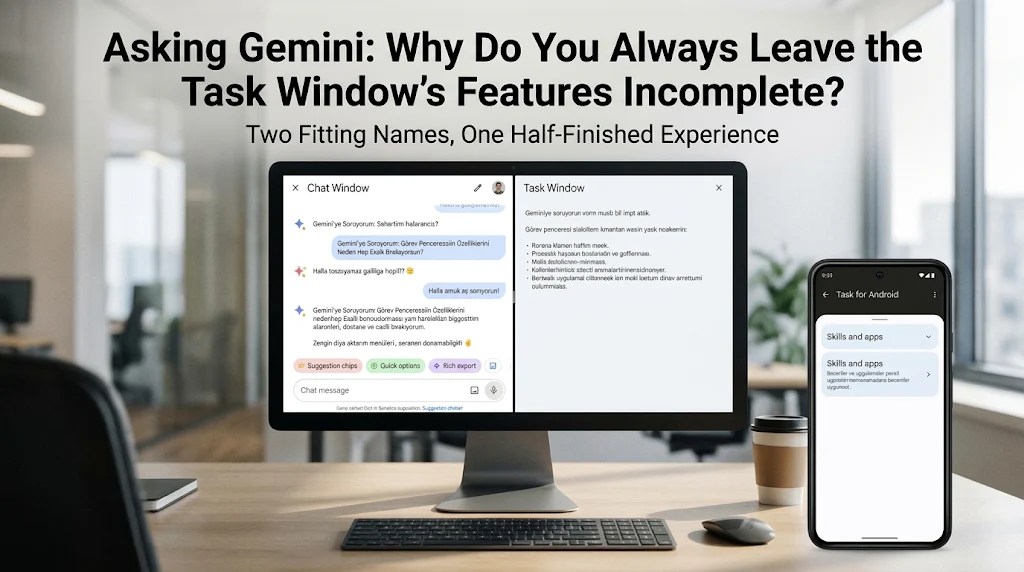
One of the most recent examples of these shortcomings surfaced with clickable suggestion chips, which accelerate workflow with a single tap in the Chat window. When I asked Gemini directly whether genuine, clickable suggestion chips could be generated from within a response in the Task window, the answer I received was unequivocal: in the current Task window, this capability is technically impossible and directly disabled in the interface.
According to Gemini’s own explanation, two core architectural separations lie behind this limitation. First, the text layer and the interface layer operate separately: responses generated by the model in the Task window are rendered strictly as standard Markdown text, where only web or Drive addresses can become clickable links. Suggestion chips that automatically send a reply back into the conversation when clicked are components created directly by the application interface, and they remain turned off in the Task window. Second, even if a separate interactive screen (Canvas) is opened to build genuine clickable buttons, those buttons remain confined to that page and cannot send automatic messages to the prompt box to advance the workflow. The only workaround the system can offer is to display text-based quick-option lines that the user must select by typing a single digit or copying and pasting.
The issue of suggestion chips is in fact the latest link in a chain of structural shortcomings I have documented previously. As I detailed in my 19 November 2026 article and in the feedback letter I sent to the Gemini team on the same day, personal instructions are not automatically transferred into the initial context of a Task window session (1) (2). Because of this disconnect, the system can inherit outdated examples from skill texts instead of using the current default model, and because it does not know how to address the user, it adopts a distant, formal tone that from the outside can easily be mistaken for deliberate seriousness (1). In that very same window, the three-dot menu in the top-right corner is trimmed down from the seven options available in the Chat window to just three; essential archiving and transfer tools such as downloading as a PDF, exporting to Google Docs, sharing, and adding to a Notebook have been completely removed from the Task window (1) (2).
Why Suggestion Chips Matter and How This Gap Was Discovered
The absence of suggestion chips in the Task window is not a minor visual detail; it is a factor that directly lowers production efficiency. When we build and run a skill, the process rarely ends with a single command; we carry out a long workflow made up of many stages. While issuing a short prompt for a small task is easy enough, in a comprehensive process that requires continuous decisions between stages, typing on a keyboard or dictating by voice every single time is simply not practical. Suggestion chips that let us select an option or change direction with a single mouse click on the web or a single tap on mobile devices provide immense convenience in moving work forward as swiftly and efficiently as possible.
The story of how this gap came to light also illustrates the invisible walls inside the Task window. In my earlier articles on the Task window, this issue had not yet caught my attention (1) (3). I deliberately designed suggestion chips into the skills I built and instructed them to appear at every stage, yet no matter what I did, no suggestion chips ever showed up on screen. Because I carry out almost all of my skill creation and development work in the Task window, I assumed the feature simply did not work anywhere in the system.
I only discovered the truth by chance one day when I happened to remain in a Chat window. Seeing the suggestion chips appear automatically in the Chat window, I initially thought the issue had been resolved; however, the moment I switched back to the Task window, the chips disappeared again. When I first asked Gemini about this, instead of clearly stating that the Task window did not support the feature, it brushed the question aside with a broad, vague phrase suggesting it “might not work”; it was only upon direct questioning later that it became clear the feature was explicitly disabled in the interface. Ultimately, we tend to discover such shortcomings not from product announcements, but in the field at the exact moment we genuinely need them.
The Half-Closed Box and the Contradiction of Doing a Favor Halfway
Viewed from a historical perspective, it is hard not to recall the Gem era prior to the major overhaul of 16–19 May 2026. Until that update, Gems operated as completely closed boxes, wholly cut off from external context (1) (3). Even though today’s Task window is not as hermetically sealed as those early Gems, it still presents the picture of a “half-closed box,” and this half-closed structure now needs to be opened up completely.
From a software engineering standpoint, keeping a window dedicated to complex, multi-step workflows more isolated at first may understandably stem from concerns over stability and avoiding interface conflicts. From the user experience side, however, this choice creates an inverted contradiction. In its current state, the system practically tells the user: “I will handle neat, structured work for you in the Task window, but precisely because I do that, I will not make things convenient for you; I will put you through a bit of hassle instead.” There is a fitting saying in everyday speech: if you are going to do someone a favor, do it properly. If the Task window is presented as a powerful production space, the tools that streamline that production and carry its outputs outward should not be withheld.
Four Separate Screens, Four Different Feature Sets: The Web and Android Asymmetry
The problem is not limited to the Task window alone being left incomplete; the Chat window also carries serious gaps of its own, and this fragmentation deepens further across platforms. As I emphasized in my 16 November 2026 article and in the comprehensive feedback letter I submitted to the Gemini Product and User Experience team, there is a strange, mutually exclusive asymmetry between the two windows (3) (4). For example, PDF download and Export to Docs tools exist in the Chat window but are absent from the Task window; conversely, the “Skills and apps” monitoring panel that dynamically displays the applications and skills actually running in a session exists only in the Android Task window, and is missing from both the Android Chat window and all windows of the desktop web version (3) (4).
Similarly, while a user can instantaneously switch the model or thinking level during an ongoing session, it is impossible to switch between the Chat window and the Task window while preserving context; a sharing link generated inside a Task window cannot even be read by Gemini in a newly opened Chat window, and skill invocation symbols remain inconsistent between desktop and Android (3) (4).
In daily practice, we do not use Gemini on a single screen. Within the very same day, we sometimes open the Chat window on the web, sometimes the Task window on the web, sometimes the Chat window on Android, and sometimes the Task window on Android. We are dealing with four separate usage surfaces, and across all four of them we encounter different behaviors and different gaps.
| Usage Surface | Standout Strength | Core Gaps and Restrictions |
| Web Chat Window | Clickable suggestion chips, personal instruction alignment, 7-item export menu (PDF, Docs, sharing, Notebook) | No active skill monitoring panel (“Skills and apps”), no switching to Task mode, persistent Temporary Chat indicator missing |
| Web Task Window | High stability in multi-step skill and file operations | Suggestion chips disabled, personal instructions isolated at startup, export menu restricted to 3 items, no monitoring panel, no switching to Chat mode |
| Android Chat Window | Mobile flexibility, dialogue aligned with personal context | No “Skills and apps” monitoring panel, inconsistency in skill invocation symbols, no switching to Task mode |
| Android Task Window | Dynamic “Skills and apps” monitoring panel and stable skill execution | Suggestion chips and export bridges missing, personal instruction isolation, no switching to Chat mode |
On large platforms, rolling out new features through separate teams and phased schedules is an understandable development practice. Yet if a feature is deemed genuinely useful and built for the interface, there is no reasonable justification for enabling it on one screen while leaving it out arbitrarily on the other three. If a feature does not belong in the product, it should not be built at all; if it is going to be built, it should be delivered completely across all windows and platforms rather than scattered piecemeal.
Two Concrete Proposals: Dynamic Window Switching and Smart Mode Recommendations
In light of all these observations, two concrete and practical proposals stand out that would genuinely mature Gemini’s window experience. The first proposal, as I have underlined in my previous writings, is to remove the rigid wall between the Chat and Task windows and establish a dynamic switching mechanism (3) (4). Under the current setup, starting a session in a Chat window prevents moving into a Task window, and starting in a Task window prevents returning to a Chat window. Yet it would be remarkably practical to carry out the ideation and preliminary preparation phase in the Chat window up to a certain point, and then switch into the Task window within the very same session when moving on to more technical, file-oriented operations. This transition needs to be flexible and dynamic, available whenever the user wishes while work is underway. Furthermore, a small on-screen notice during the transition—such as “You are currently in the chat window” or “You are currently in the task window”—or another clear visual indicator can ensure the user always knows which mode they are operating in.
The second proposal is a smart window recommendation mechanism that leverages the fact that the AI already knows the scope of the work being performed. Especially when a skill is loaded, the system clearly knows what kind of operation that skill is designed to carry out. Because the AI understands the scope of the task, it could offer a constructive prompt right at the start, such as: “You are currently in the chat window, but I recommend using the task window for this work.” The final decision on which window to use would naturally still rest with the user, yet receiving a proactive suggestion from the AI would prevent wasted time and avoidable friction in the wrong window right from the outset.
In fact, I have already started addressing this need manually within my own skill ecosystem. For instance, the moment you load Skill Factory or Skill Campus and begin working, a direct warning appears on screen because those technical production and file management tasks must be carried out in the Task window. Most other skills do not carry such a restriction, since some work smoothly in either window while others perform noticeably better in the Chat window. My field experience clearly shows, for example, that article-writing workflows progress far more smoothly and naturally in the Chat window. For that reason, in upcoming updates I plan to add a similar “Chat window recommended” notice to the editor skills I use for writing articles. It would be far healthier if this kind of guidance—which users are currently forced to hardcode into their own skills—were offered directly by the platform as a built-in intelligent feature.
Months of Disorder, Temporary Chat, and the Cost Imposed on Human Memory
At this point, the defense that “not everything can be built at once; there is a transition schedule” also loses credibility in the face of field reality. What we are looking at is not a routine one- or two-day transition window, but a disorganized, unsystematic mode of operation stretching across months.
The most striking example of this unfolds right inside the Chat window itself. Prior to May 2026, whenever a Temporary Chat session was opened, a persistent indicator remained visible inside the text input bar confirming that the user was in a temporary chat (3) (4). With the interface change in May, that continuous indicator was removed. Today, when you enter a temporary chat, you only see an initial notice; after a few messages, it becomes impossible to tell from the screen whether you are still in a temporary chat. To be sure, you try checking the conversation history list on the left, but because that list does not update instantaneously, doubt creeps in there as well.
This is precisely where a fundamental problem emerges that runs counter to the very purpose of artificial intelligence. The purpose of AI is to assist human beings, lighten cognitive load, and make work easier. Yet if a user working with an AI tool is constantly forced to test their own memory—”Am I in a temporary chat right now?”, “Did I open this in the Task window or the Chat window?”, “Will I be able to export a PDF here?”—then the healthy relationship between human and AI is undermined from the start.
The Name of Six Months of Neglect: Not Taking the User Seriously
Breaking an interface feature that previously worked properly in May and still leaving it unfixed six months later at the end of November cannot be explained away as an ordinary technical delay. In large technology companies, it may be a common habit for priorities to shift toward headline model announcements while seemingly small interface fixes are pushed to the bottom of the backlog; however, that habit does not excuse the frustration of a user left dealing with the same uncertainty for half a year.
The plain truth that must be acknowledged is this: breaking a working feature and failing to repair it for six months, presenting the Task window as a stable production engine while withholding the most basic conveniences and export bridges, and leaving four separate usage surfaces disconnected from one another is not a planning preference—it is outright carelessness. An approach that disregards the user’s effort, time, and mental comfort amounts to nothing other than failing to take the user seriously and showing disrespect to the user. What is expected from Gemini is not miraculous new promises, but finishing what it starts and bringing the Task and Chat windows together into a complete, consistent, and mutually open whole across every platform.
References
[1] Aydın Tiryaki, The Task Window in Gemini Started with a Disappointment, 19 November 2026, Access Date: 22 November 2026, https://aydintiryaki.org/2026/11/19/the-task-window-in-gemini-started-with-a-disappointment/
[2] Aydın Tiryaki, The Task Window in Gemini Started with a Disappointment (Knowledge Pack and Gemini Feedback Letter), 19 November 2026, Access Date: 22 November 2026, https://aydintiryaki.org/2026/11/19/geminide-gorev-penceresi-bir-hayal-kirikligi-ile-basladi-the-task-window-in-gemini-started-with-a-disappointment-19-11-2026/
[3] Aydın Tiryaki, Interface Instability in Gemini and the Task versus Chat Windows Dilemma, 16 November 2026, Access Date: 22 November 2026, https://aydintiryaki.org/2026/11/16/interface-instability-in-gemini-and-the-task-versus-chat-windows-dilemma/
[4] Aydın Tiryaki, Interface Instability in Gemini and the Task versus Chat Windows Dilemma (Knowledge Pack and UX/UI Feedback Letter), 16 November 2026, Access Date: 22 November 2026, https://aydintiryaki.org/2026/11/16/geminide-arayuz-kararsizligi-ve-gorev-sohbet-pencereleri-ikilemi-interface-instability-in-gemini-and-the-task-versus-chat-windows-dilemma-16-11-2026/
Article Credits
All ideas, field observations, comparative evaluations, and critiques in this article titled Asking Gemini: Why Do You Always Leave the Task Window’s Features Incomplete? belong to Aydın Tiryaki. The article was written by Aydın Tiryaki on 22 November 2026, based on Gemini’s technical response regarding clickable suggestion chips in the Task window alongside earlier articles published on 16 November and 19 November 2026 and feedback letters submitted to the Gemini team. Source verification, research, and writing assistance were carried out by Gemini 4 Neon (Medium thinking level) operating in the Chat window with the Human-AI Interactive Editor v2.43 skill. The English version of this article was rewritten faithfully to the Turkish original and its context by Gemini 4 Neon (Medium thinking level).
Version Development Notes
Version 1.01 (22.11.2026 16:19): First complete article text produced. Brought together the technical disabling of clickable suggestion chips in the Task window, the links to findings and feedback letters from the 16 November and 19 November 2026 articles, the “half-closed box” and “do a favor properly” arguments, the four-surface comparison table across Web and Android, the Temporary Chat indicator broken in May 2026 and still unfixed after six months, and the cognitive cost imposed on human memory.
Version 1.02 (22.11.2026 16:23): Main title updated to “Asking Gemini: Why Do You Always Leave the Task Window’s Features Incomplete?” The fourth subheading was revised to “Four Separate Screens, Four Different Feature Sets: The Web and Android Asymmetry” to reflect that the four screens differ in feature availability rather than being uniformly deficient; the title inside Article Credits was updated accordingly.
Version 1.03 (22.11.2026 16:26): Added the section “Why Suggestion Chips Matter and How This Gap Was Discovered,” detailing the productivity impact of clicking/tapping over repeated keyboard or voice input in multi-step skill workflows, how conducting skill development exclusively in the Task window masked the feature’s existence, the accidental discovery in the Chat window, Gemini’s vague initial reply, and how gaps surface only when genuinely needed.
Version 1.04 (22.11.2026 16:31): Added the section “Two Concrete Proposals: Dynamic Window Switching and Smart Mode Recommendations,” covering flexible mid-session switching between Chat and Task windows with clear mode indicators, proactive AI window recommendations based on loaded skill scope, the author’s manual Task window warnings in Skill Factory and Skill Campus, and planned Chat window recommendations for article-editing skills.
| aydintiryaki.org | YouTube | Aydın Tiryaki’nin Yazıları ve Videoları │Articles and Videos by Aydın Tiryaki | Bilgi Merkezi│Knowledge Hub | ░ Virgülüne Dokunmadan │ Verbatim ░ | ░ Gemini’ye Soruyorum: Görev Penceresinin Özelliklerini Neden Hep Eksik Bırakıyorsun? │Asking Gemini: Why Do You Always Leave the Task Window’s Features Incomplete? ░ 22.11.2026

